FAQ Schema Generator
Paste your questions and answers and get valid FAQPage JSON-LD. The markup must match the FAQ visible on your page. Google now shows FAQ rich results only in limited cases, but clear FAQ markup still helps machines read the page.
Quick answer
Turn questions and answers into FAQPage JSON-LD and an HTML preview. Free tool for AEO and AI search.
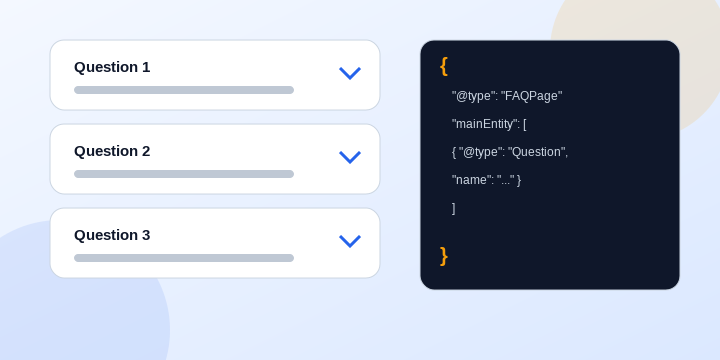
Google requires the same questions and answers to be visible on the page. Use the HTML copy button for a ready accordion.
How to use it
- Write each question after Q: and each answer after A:.
- Click Generate to build the JSON-LD and a preview.
- Paste the script into the page head or body.
- Make sure the same questions and answers are visible on the page.
Writing answers that get used
- Start with a direct answer in one or two sentences
- Use the real wording people search
- Keep answers factual and consistent with the page
Learn more in our answer engine optimization guide, or build other markup with the schema generator.
What FAQ schema is
FAQ schema is structured data that labels questions and answers on a page so machines can read them. A faq schema generator turns plain text into the correct JSON-LD, which saves you from writing brackets and quotes by hand. The markup must match an FAQ that visitors can actually see on the page.
How to write good questions and answers
- Use the exact wording customers use when they search or message you
- Answer in the first sentence, then add detail only if it helps
- Keep each answer under about 60 words
- Do not hide promotions or links in the answer
- Make sure each question appears once on the page
Where to add the markup
Paste the generated script into the page head or just above the closing body tag. In WordPress you can use a header and footer plugin or your SEO plugin. After publishing, test the page with Google's Rich Results Test. Valid faq schema markup does not guarantee a rich result, because Google shows FAQ results only in limited cases, but it still describes your content clearly to search engines and AI tools.
FAQ schema and AI search
Clear question and answer pairs are easy for assistants to quote. Pair this tool with our answer engine optimization service and the schema markup generator. If you need a different type of json ld generator output, such as LocalBusiness or Article markup, the schema tool covers those formats.
FAQ
Does FAQ schema still give rich results?
Google limits FAQ rich results to a small set of sites, so do not expect a visual change. The markup is still valid and readable by machines.
Must the FAQ be visible on the page?
Yes. Markup should match content that users can see.
How many questions should I add?
Add the questions people really ask, usually 5 to 10 per page.
Is FAQ schema a ranking factor?
No. It helps machines understand the page. Rankings still depend on content quality and relevance.
Can I add FAQ schema to every page?
Only add it where a real FAQ is visible. Repeating the same questions everywhere looks spammy.
How do I test my markup?
Use Google's Rich Results Test or the Schema Markup Validator and fix any errors it shows.
Need a custom tool or AI SEO help? See custom SEO tool development, our AI SEO services or message us on WhatsApp.
How this topic connects: the layers of free seo and marketing tools
Search engines and AI assistants understand a subject through connected ideas. This map shows where this page sits and what to read or compare next.
| Topic layer | What it covers | Where to go |
|---|---|---|
| Core | FAQ Schema Generator | This page |
| Topic hub | All free tools | Free tools |
| Tools and guides | Free resources for this topic | Free website SEO checker, Keyword density guide, UTM parameters guide |
| Next step | Get a written quote or help | Contact WCV Digital |
Questions answered on this page: Does FAQ schema still give rich results? | Must the FAQ be visible on the page? | How many questions should I add? | Is FAQ schema a ranking factor?
About WCV Digital and this page
WCV Digital is a Karachi-based digital agency (Plot H 7/12C, Block 3 Nazimabad, Karachi 74600) offering web design, development, software and SEO. The business operates under Wholesale (WCV) Ltd, registered in the United Kingdom with Company No. 16571122. Last reviewed: November 2026 by the WCV Digital team. Rules, platforms and tool features change, so confirm current details before you commit.
More free tools
What FAQ schema is
FAQ schema is structured data that marks up questions and answers on a page so that search engines can understand them. You write the questions and answers once, and the generator produces JSON-LD code to add to the page. When the markup matches visible content, it helps search engines and AI assistants match your page with question-style searches.
An important note on rich results
Google now shows FAQ rich results in search only for a limited set of well known government and health sites. For most businesses the visual dropdowns no longer appear. FAQ markup is still valid and useful for clear structure, for other search engines and for AI systems that read your page, so it remains good practice if the questions are real and visible on the page.
How to write good FAQs
- Choose questions that real customers ask, from calls, chats and Search Console queries.
- Answer in the first sentence, then add detail.
- Keep answers between 40 and 80 words.
- Use plain language and include your service or product name naturally.
- Avoid promotional claims and links crowded in the answer.
- Do not repeat the same FAQ on many pages.
How to use the FAQ schema generator
- Enter each question and its answer.
- Add as many pairs as you need.
- Generate the JSON-LD code.
- Paste it in a script tag of type application/ld+json on the same page.
- Check the page with the Rich Results Test and fix any errors.
The questions and answers in the code must appear in the visible page text, or the markup can be treated as misleading.
Where to place FAQs on a page
Put a short FAQ section near the end of a service or product page, or weave one or two questions into relevant sections. For tool pages like this one, the questions near the bottom answer common concerns about price, privacy and use. Related markup types are explained in our schema markup generator guide.
FAQs for local SEO and AI
Questions that include a city or area, such as how much does a website cost in Karachi, mirror how people search and how AI assistants answer. Give honest ranges and explain what affects price. Direct, accurate answers are more likely to be quoted than long sales text. See our answer engine optimization services for a complete approach.
Maintenance
Review FAQs every few months. Update prices, policies and links, and remove questions that no longer apply. Validate again after changes, and keep your code and visible content identical.
Example FAQ for a service page
For a web design page, good questions are: How much does a business website cost in Pakistan, How long does it take to build a website, Will my site work on mobile and Do you provide hosting and support. Each answer begins with a direct statement, such as Most business websites take two to four weeks, then adds the factors that change the timeline. This style is easy for readers, search engines and AI tools to use.
Quality checks before publishing
Read every answer as if you were the customer. Does it answer the question in the first sentence, is the information correct and does it avoid hype? Remove questions that exist only to repeat keywords. Confirm that the code matches the visible text exactly, then validate the page.
Free guide: write FAQs that win rich results and AI answers
FAQ schema marks up questions and answers so search engines and AI tools can read them cleanly. Use this checklist with the report above.
Pick questions real people ask
- Start from Google's People also ask box and your customers' emails and calls
- Use the Suggest questions button for ideas about cost, time, process and comparison
- Write each question the way a customer would type or say it
Write answers that get used
- Give the direct answer in the first sentence
- Keep answers between 20 and 60 words, then add one line of detail
- Include the main keyword once, naturally
- Never write exact prices or claims you cannot prove
Placement and rules
- The questions and answers must be visible on the same page as the schema
- Use one FAQ block per page and 4 to 10 questions
- Do not repeat the same FAQ on many pages
- Google shows FAQ rich results for only some sites now, but the markup still helps AI and voice answers understand the page
Routine
- Add the FAQ block to every service and guide page
- Download the Excel report and keep it with your content plan
- Re-test the page in the Rich Results Test after publishing
Questions people ask
Can I add FAQ schema to any page?
Yes, if the page actually shows those questions and answers to visitors.
Will FAQ schema create dropdowns in Google?
Rarely now. Google limits these to certain sites, but the markup still helps understanding.
How many FAQs should I add?
Between three and ten useful questions per page is typical.
Do I need to code it by hand?
No. The generator writes valid JSON-LD for you.
Is the FAQ schema generator free?
Yes, free to use.