Google Maps Scraper Chrome Extension for Lead Generation
WCV Digital Outreach Hub collects local business leads from Google Maps, checks each lead's website, and helps you contact them on WhatsApp and email, one by one or in bulk. Search a business type in a city, press one button, and get a clean list with phone numbers, websites, ratings and review counts.
Works in Google Chrome on Windows, macOS and Linux. Pay once, no subscription. Your leads never leave your browser.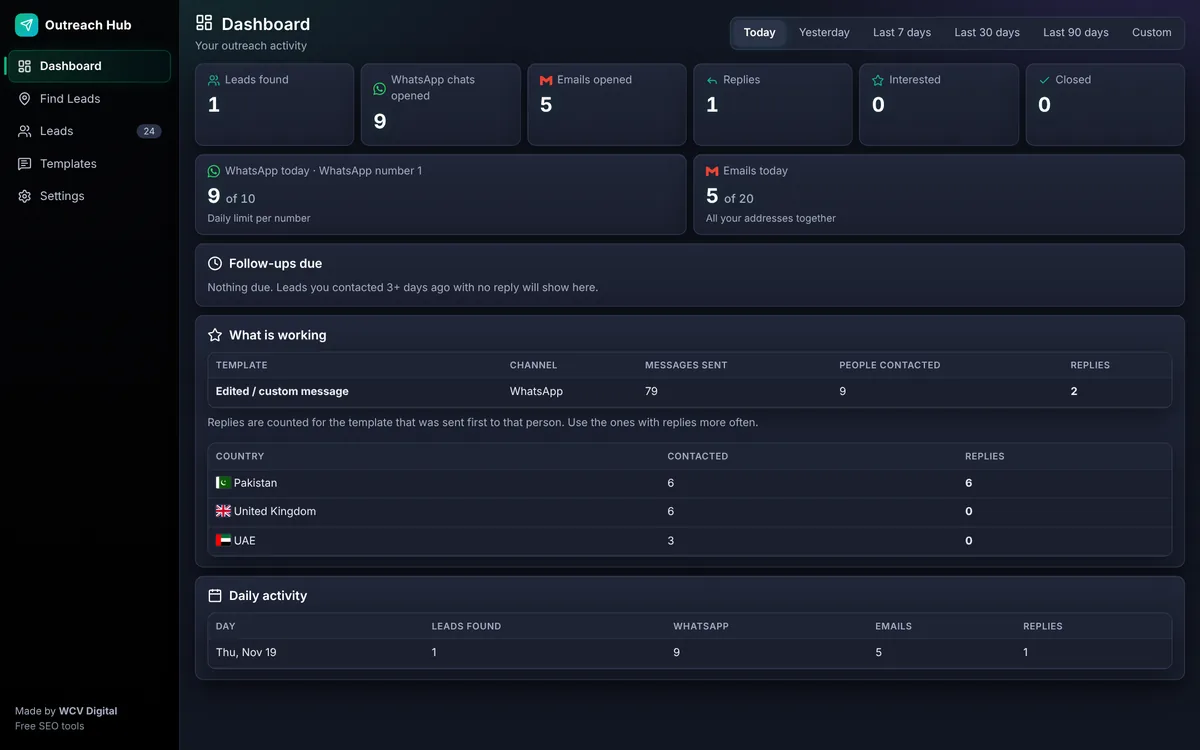
Quick answer
This extension is a Google Maps lead scraper with a built-in website checker and WhatsApp and email outreach. Buy it for Rs 2,200, load it in Chrome, search Google Maps, and collect leads with phone and website in one click.
What you can do with it
Everything from finding the lead to the follow-up, in one small extension.
Name, category, rating, reviews, address, phone and website for every listing. Keep only listings with a phone number, set a maximum review count, and skip duplicates automatically, and collect several searches at the same time in separate background windows.
A mobile speed score from Google PageSpeed plus an SEO checklist: HTTPS, title, meta description, H1, schema and image alt text. Tick the issues you want to mention.
Templates with the business name and city filled in, a daily limit and a minimum gap between chats, and a warning before you message someone twice. Add several of your numbers, each with its own limit and an On/Off switch.
Send from your own Gmail or Outlook accounts. Add as many accounts as you like, each with its own daily limit and On/Off switch, and choose whether they take turns or fill one by one. Your own signature is added to every email.
Select leads and press Send WhatsApp to all or Send email to all. The tool sends one at a time with a safe gap, in the background, so you can close the Hub tab. A progress message shows on every page and closes when the work is done.
Statuses from New to Replied, follow-up reminders, best time to message by country, and Excel or PDF export of your list.
No account and no server. Leads, templates and settings are stored in your browser only.
See the tool
Real screenshots from inside the extension.
Dashboard: your own activity by day, with a time range filter.
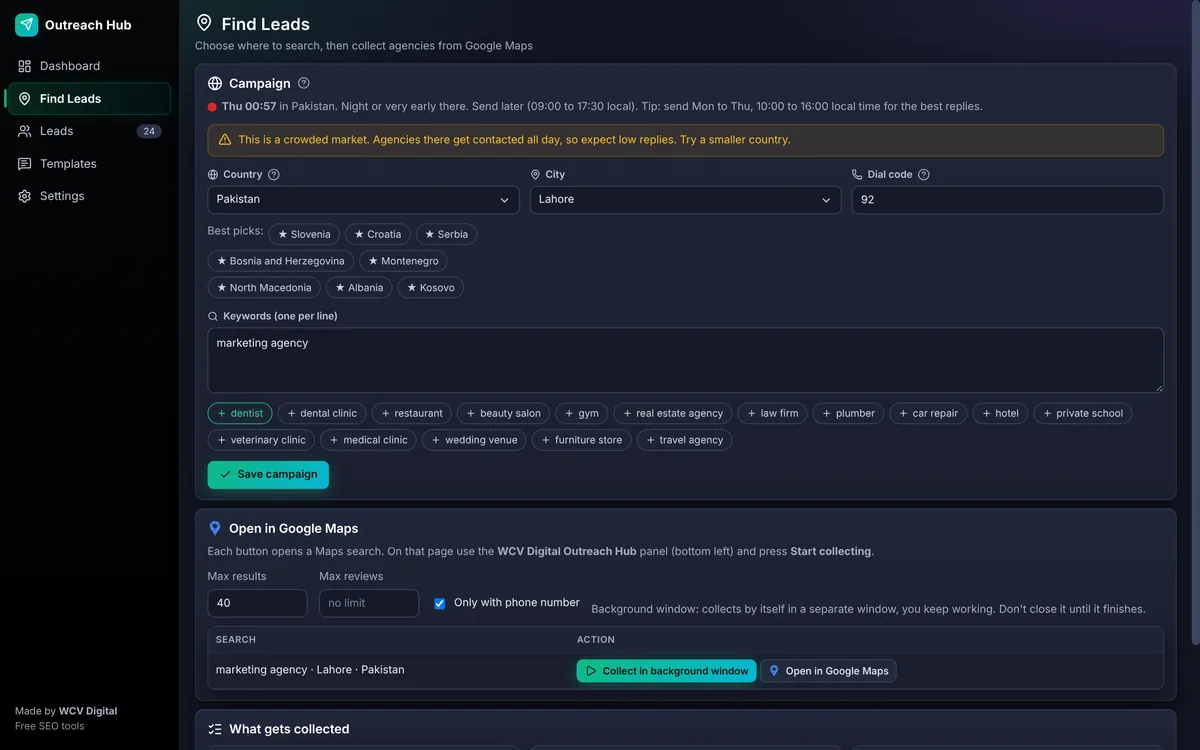
Find Leads: choose where to search, then collect in a background window.
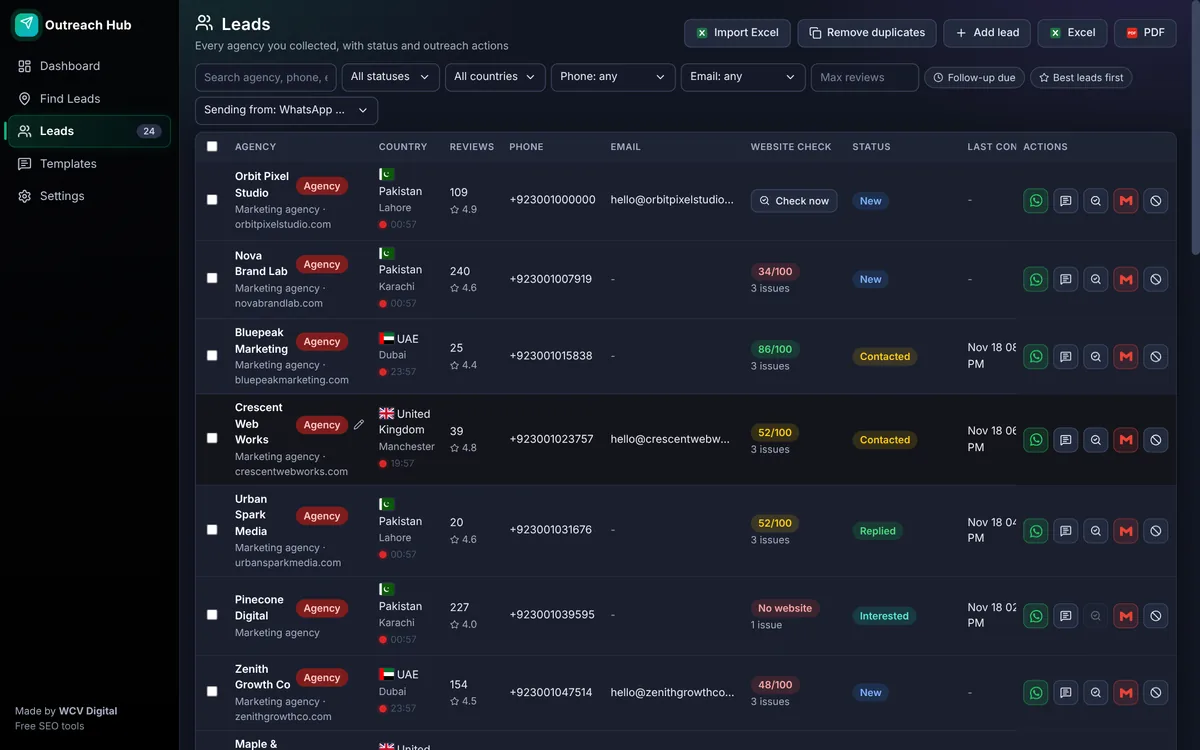
Leads: every business with its website score, status and one-click outreach actions.
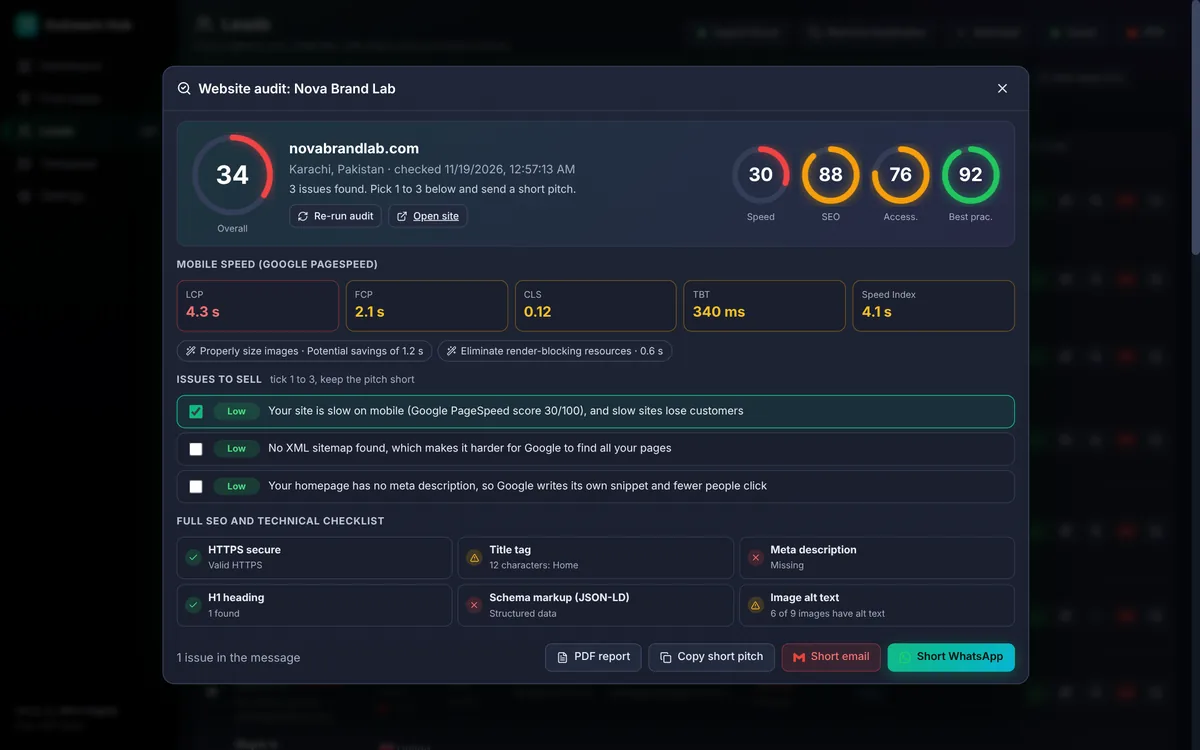
Website check: scores, issues and the checklist behind each lead.
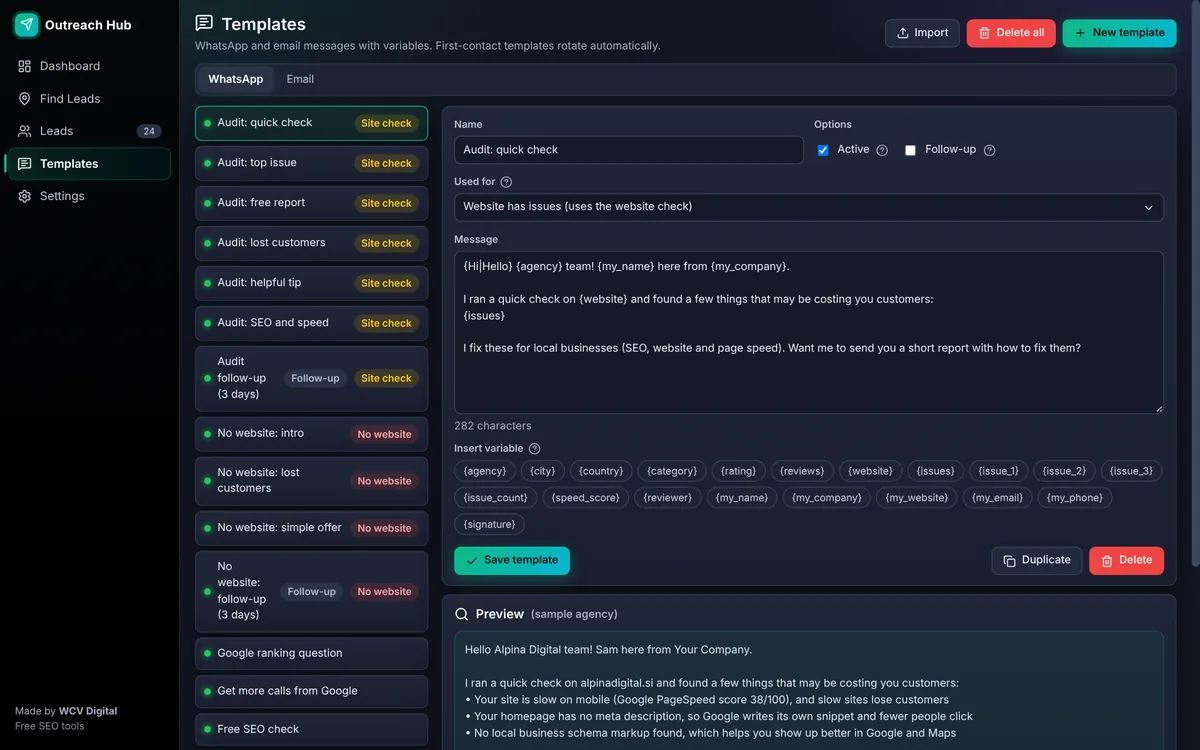
Templates: edit the ready messages or write your own.
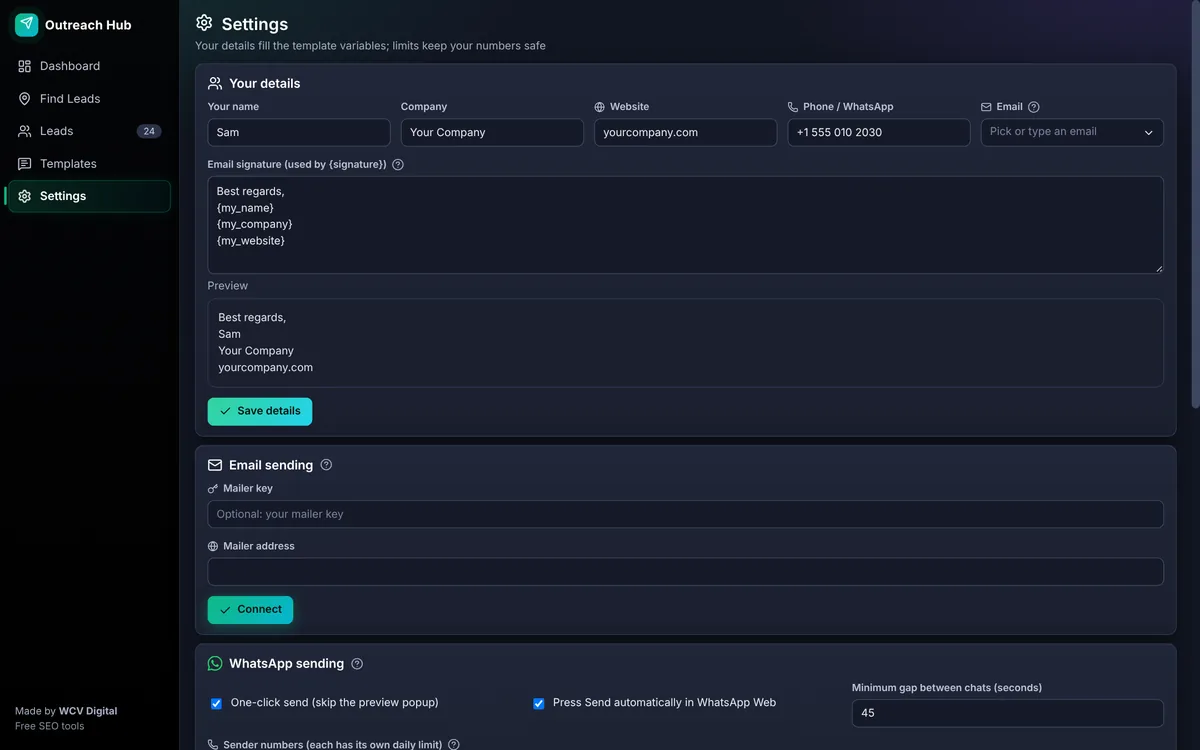
Settings: add your details once and every template and signature uses them.
Watch the 1-minute tutorial
The full flow in one minute: pick a country and city, collect leads from Google Maps, check a website and send the first WhatsApp message.
- Choose a country, city and keyword, for example dentist in Karachi.
- Open Google Maps from the extension and collect name, phone, website and rating.
- Run the one-click SEO check to see which websites have problems.
- Pick a WhatsApp or email template and send to all leads in the background.
Prefer YouTube? Watch it on our channel.
How to buy
Rs 2,200 one time. Pay by JazzCash or Easypaisa.
- Message us. Press Buy for Rs 2,200. WhatsApp opens and we send you the payment details.
- Pay Rs 2,200. Send the amount by JazzCash or Easypaisa and share the payment screenshot on WhatsApp.
- Get your download. After we confirm the payment, we send you the download link. Then follow the install steps below.
How to install the extension in Chrome
The extension is not in the Chrome Web Store yet, so you load it once by hand. It takes about a minute.
- Get the file and unzip. After payment we send you the zip on WhatsApp. Right click it and choose Extract all.
- Open the extensions page. Type
chrome://extensionsin the address bar and press Enter. - Turn on Developer mode. Use the switch at the top right of the page.
- Click Load unpacked. Pick the unzipped
WCV-Digital-Outreach-Hubfolder, the one that containsmanifest.json. - Pin it. Click the puzzle icon in Chrome and pin WCV Digital Outreach Hub. Click the icon to open the Hub.
- Add your details. Open Settings, add your name, company, website and phone, then press Save details. Your messages use these details.
How to collect Google Maps leads
Three steps from search to a ready list.
- Pick the market. Open Find Leads, choose a country and city, and type a keyword such as dentist or plumber. Starred countries have fewer agencies per city, so replies are easier to get.
- Press Collect in background window. A separate window opens Google Maps and reads each listing by itself. Keep working in your normal window and do not close the collecting window until it finishes.
- Review your leads. New leads appear in the Leads page with their phone, website and rating. Duplicates are skipped, even across different searches.
Check a lead's website before you message
The website check shows a mobile speed score and a full SEO and technical checklist. Pick one to three real issues, and the tool writes a short, honest message about them. A message that mentions a real problem on the business's own site gets more replies than a generic pitch.
Templates for WhatsApp and email
Templates fill in the business name, city, your company and signature, and rotate automatically so every message is not identical. You can edit them, add your own, or save a custom message as a new template.
Use it safely
Good outreach keeps your numbers and your name safe.
- Start with a small number of messages per day and raise it slowly.
- Send only to businesses you can honestly help, and mention something specific about their business.
- Do not message people who said no. The tool marks them so you do not contact them again.
- Follow Google Maps terms, WhatsApp rules and the marketing laws of the country you are contacting.
Frequently asked questions
How much does the Google Maps scraper extension cost?
Rs 2,200, one time. No monthly fee, no account and no credit limit set by us. Pay by JazzCash or Easypaisa, send the payment screenshot on WhatsApp, and we send you the download link.
Where is my data stored?
Everything you collect stays inside your own browser on your computer. We do not receive your leads, messages or settings. You can export your leads to Excel or PDF at any time.
How do I install it, it is not in the Chrome Web Store?
Unzip the file we send you, open chrome://extensions, switch on Developer mode, click Load unpacked and pick the unzipped folder. The steps above show each click. It takes about one minute.
Can I send to many leads at once?
Yes. Select your leads and press Send WhatsApp to all or Send email to all. The tool works through them in the background with a gap between each one and stops at your daily limit. Keep Chrome open; the Hub tab itself can be closed.
Does it need an API key?
No. The website check uses the free Google PageSpeed service. If you check a lot of sites in a short time Google may ask you to wait a little.
Can I send email from my own accounts in one click?
Yes. Add your own Gmail or Outlook accounts in Settings and the tool sends from them, with your signature and a daily limit for each account. You can also connect your own mailer script on your hosting if you prefer.
Will WhatsApp ban my number?
Any bulk messaging carries a risk. The tool helps you stay safe with daily limits per number, a minimum gap between chats, rotating templates and a warning before you message the same person twice. Start small and send relevant messages only.
Is scraping Google Maps allowed?
Google Maps has its own terms of use and rules differ by country. Collect only public business details, keep volumes low, and follow the laws on marketing messages where your leads are. You are responsible for how you use the tool.
Does it work on Edge, Brave or Firefox?
It is built for Google Chrome. Other Chromium browsers can load it in the same way, but we only test it in Chrome. Firefox is not supported.
Want it done for you?
If you would rather have someone else do the work, WCV Digital builds fast websites, runs local SEO and Google Business Profile optimization, and can build custom tools like this one for your business. See our custom SEO tool development and paid tools, or try the free website SEO checker. Want a hosted sender for your team instead? See the WhatsApp bulk message sender.