eBay Product Research Tool for Fast Selling Items
eBay Fast Sellers is an eBay product research tool and product hunting extension for Chrome. Scan any seller, apply your own 30 and 60 day sales rules, and get a clean list of fast selling products on eBay that you can filter and export to Excel or CSV.
Works in Google Chrome on Windows, macOS and Linux. Pay once, no subscription. You need to be signed in to eBay.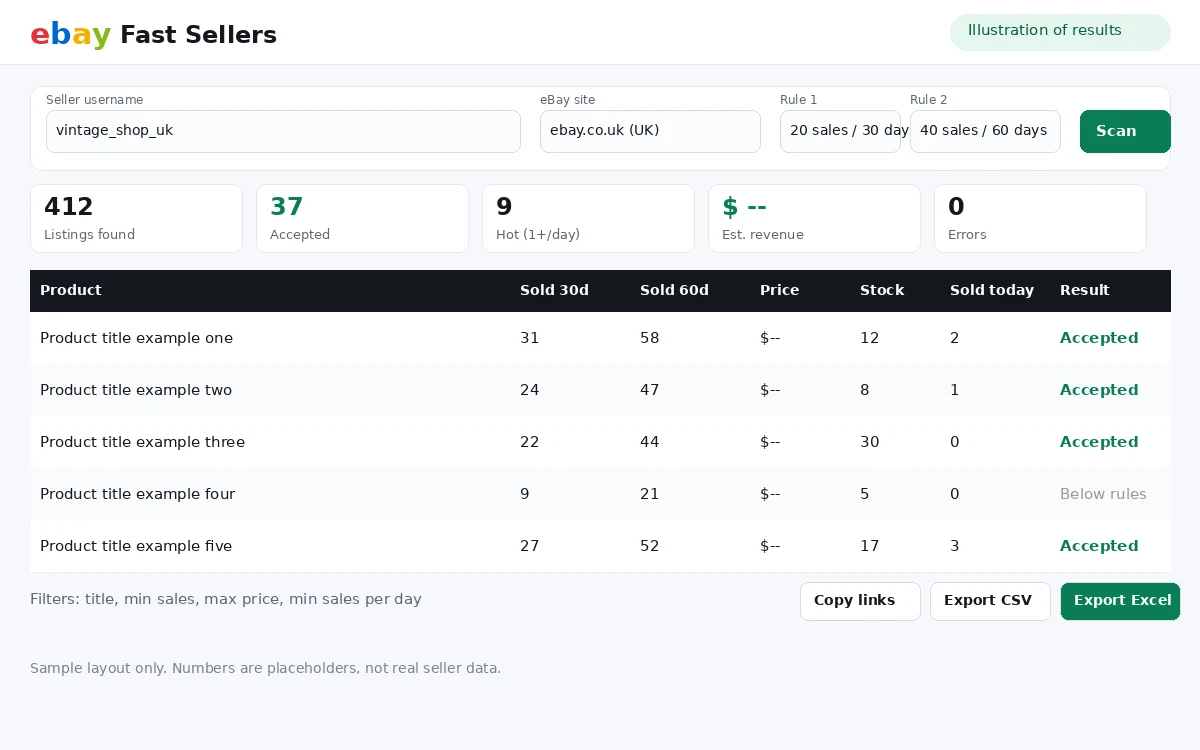
Quick answer
eBay Fast Sellers is a Chrome extension that works as an eBay product research tool. Enter seller usernames, set minimum sales for the last 30 and 60 days, and it lists the fast selling items on eBay that pass. Buy it for $45 one time, load it in Chrome, sign in to eBay and start your product hunting.
What the eBay product research tool does
Product hunting from seller stores, with your own rules, in one small extension.
Type a seller username and the tool reads their active listings. Paste several sellers separated by commas to compare many stores in one run, so product hunting stops being one store at a time.
Set the minimum sales a listing needs in the last 30 days and in the last 60 days. Only listings that pass your rules are accepted, which keeps the list to real fast selling items on eBay.
Pick the marketplace you sell on, from ebay.com to the regional sites. Research the market your buyers use instead of guessing from US data.
Filter the results by title keyword, minimum sales, maximum price and minimum sales per day. Narrow a large scan down to a short list of trending products.
Export the accepted listings to Excel or CSV, or copy the listing links and paste them into your sourcing sheet. Nothing needs retyping.
The extension works inside your own Chrome, using your own eBay login. We do not receive your searches or your results.
What sells on eBay fast: how the tool answers it
Most sellers ask what sells on eBay fast and then guess from a few sold listings. The reliable answer is in the sales history of stores that already sell well. This tool reads that history for you. For every listing it checks the sales in the last 30 days and the last 60 days, and keeps the listing only if it passes the two numbers you set.
Two windows matter because one is not enough. A listing with strong 30 day sales that is weak over 60 days may be a short spike. A listing that passes both is steady demand, the kind of fast selling item that is worth sourcing. You can also filter by minimum sales per day, so a product that sells every day ranks above one that sold in a single burst.
This is product research, not a promise. Sales numbers show demand, not profit. Always check your own cost, shipping and eBay fees before you buy stock, and look at the competition on the listing.
See the tool
An illustration of the results screen: sales rules on top, results below, export on the right.
Illustration with placeholder numbers. Your real results come from the sellers you scan.
Watch the eBay product research tool in action
A short walkthrough: scan a seller, apply the 30 and 60 day sales rules, and export the fast selling items.
How to buy
$45 one time. Pay by Wise or bank transfer.
- Message us. Press Buy for $45. WhatsApp opens and we send you the payment details.
- Pay $45. Send the amount and share the payment screenshot on WhatsApp.
- Get your download. After we confirm the payment, we send you the download link. Then follow the install steps below.
How to install the extension in Chrome
The extension is not in the Chrome Web Store, so you load it once by hand. It takes about a minute.
- Get the file and unzip. After payment we send you the zip. Right click it and choose Extract all.
- Open the extensions page. Type
chrome://extensionsin the address bar and press Enter. - Turn on Developer mode. Use the switch at the top right of the page.
- Click Load unpacked. Pick the unzipped folder, the one that contains
manifest.json. - Pin it. Click the puzzle icon in Chrome and pin eBay Fast Sellers.
- Sign in to eBay. Open ebay.com in the same Chrome profile and log in. The tool needs your session to read sales history.
How to find fast selling products on eBay with it
Four steps from a seller name to a sourcing list.
- Pick the sellers. Open the tool, choose your eBay site and type one or more seller usernames separated by commas. Choose stores in your niche that already sell well.
- Set the two rules. Enter the minimum sales for 30 days and for 60 days. Start with modest numbers, then raise them if the list is too long.
- Run the scan. The tool reads each active listing and marks the ones that pass. Keep Chrome open until it finishes.
- Filter and export. Filter by title, price or sales per day, copy the links or export to Excel or CSV, and start checking suppliers.
eBay trending products and hot products: use it with your own judgment
Searching for eBay trending products or eBay hot products usually gives you generic lists that every other seller sees too. Scanning real seller stores gives you a different angle: you see what a competitor sells every day, not what a blog said last month. Run the same scan weekly and you will notice which items keep passing your rules and which drop off.
A simple routine works well. Pick five sellers in your niche, scan them on the same day each week, export the accepted items, and mark the ones that appear twice. Those repeat winners are the best candidates for a test order. The tool does the reading; the decision stays with you.
Use it responsibly
Good research keeps your account and your money safe.
- Scan at a normal pace. Very large scans in a short time can make eBay slow down or ask you to verify.
- Treat sales numbers as demand signals. Check cost, shipping and fees before you buy stock.
- Respect eBay's terms and every brand's rights. Do not copy another seller's photos or descriptions.
- The tool reads public listing information. You are responsible for how you use the results.
Frequently asked questions
How much does the eBay product research tool cost?
$45 USD, one time. No monthly fee and no account with us. Message us on WhatsApp, pay by Wise or bank transfer, and we send you the download link after we confirm the payment.
What is an eBay product hunting tool?
It is software that finds products worth selling by showing what already sells. eBay Fast Sellers is a product hunting tool for Chrome: it scans seller stores, checks 30 and 60 day sales on each listing and keeps only the items that pass your rules.
How does it find fast selling products on eBay?
You give it one or more seller usernames and two sales rules. It reads each active listing, compares the sales numbers with your rules, and marks the listings that pass. You then sort or filter by sales per day, price or title.
Do I need to log in to eBay?
Yes. Sales history is only visible when you are signed in to eBay in the same Chrome profile, so log in first. The tool uses your own session and never asks for your password.
How far back does the sales data go?
The sales numbers come from eBay's own listing history, which covers about 90 days. That is why the rules use 30 and 60 day windows.
Which eBay sites does it support?
It supports 19 eBay sites. Choose the site in the tool before you scan, so the results match the marketplace you plan to sell on.
How do I install it, it is not in the Chrome Web Store?
Unzip the file we send you, open chrome://extensions, switch on Developer mode, click Load unpacked and pick the unzipped folder. It takes about one minute.
Can I try it before I pay?
The tool has a demo mode that shows how a scan and the results table look, so you can see the layout before you buy. Message us on WhatsApp if you want a walkthrough.
Is this the same as Terapeak?
No. Terapeak is eBay's own research tool inside Seller Hub. This extension is a separate, one-time purchase that scans specific sellers and applies your own sales rules, then exports a clean list. Many sellers use both.
Want a custom tool for your business?
WCV Digital builds fast websites, runs local SEO and builds custom tools like this one. See our custom SEO tool development and paid tools, or try the free website SEO checker.